

Bullhorn is a leading software platform for the staffing and recruitment industry, helping agencies manage the recruitment lifecycle from sales and sourcing through to placement and operations. Used by more than 10,000 companies globally, it gives staffing teams a single cloud-based platform to manage candidates, clients, jobs, and placements.
Visit Website

Xemplo Native (built by Xemplo)
Xemplo Connect Bullhorn for Salesforce integration

Faster onboarding
Trigger the right onboarding workflows for every worker.

Better visibility
Always know what's been sent, signed, or still needs follow-up.

Less rekeying
Sync placements, rates, and changes with fewer manual steps.
Your recruiters live in Bullhorn. Xemplo takes over the middle and back-office work that follows – from contracts and onboarding to compliance, timesheets, payroll preparation, and client billing.
Why connect Bullhorn to Xemplo?
Connect Bullhorn to Xemplo to limit manual handover, move placements faster, and give recruiters, operations, as well as compliance teams a clearer pathway from placement to paid work.

Placement data flows directly from Bullhorn into Xemplo, triggering contracts, onboarding tasks, credential checks, and worker self-service setup.

Recruiters enter information once in Bullhorn. Xemplo leverages this same data to generate compliant agreements, work orders, and onboarding workflows. No copy-paste required.
Recruiters enter information once in Bullhorn. Xemplo leverages this same data to generate compliant agreements, work orders, and onboarding workflows. No copy-paste required.

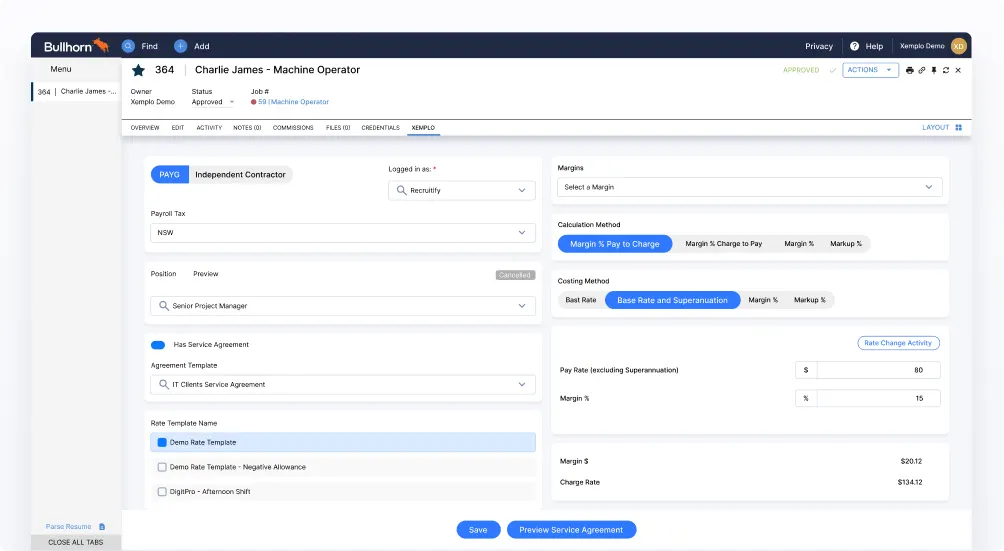
Consultants can model pay rates, charge rates, and margin with Xemplo's rate calculator inside Bullhorn (before a placement is committed).

Visa checks, police clearances, qualifications, and right-to-work are verified during onboarding (and continuously monitored in Xemplo).

Agencies on this integration process more placements per back-office FTE, because the work (chasing signatures, validating documents, preparing payroll) now runs itself.
The integration passes placement data into Xemplo to trigger onboarding, compliance, and assignment workflows, then syncs key updates back to Bullhorn so recruiters always stay informed.
| In Integration | Sync Direction | In Xemplo |
|---|---|---|
 Placement
|
→ |
 Assignment
|
|
Job
|
→ |
Engagement
|
|
Candidate
|
→ |
Worker
|
|
Company
|
→ |
Host Company
|
|
Contact
|
→ |
Service Agreement Approver & Timesheet Approver |
|
Placement Pay Rate
|
← |
Base Pay Rate
|
|
Placement Charge Rate
|
← |
Base Charge Rate
|
When users trigger the Xemplo sync from the Bullhorn Placement screen, the Placement becomes an Assignment in Xemplo. The Assignment represents the worker’s active placement with the host client and contains the key details required to support timesheets, payroll, and billing in the platform. Key data from the Bullhorn Placement is synced to the Xemplo Assignment – including the start date, end date, assignment number and assignment name. As part of this process, the user also selects the Xemplo rate template to use from within the Xemplo tab.
As part of the same sync flow, the Bullhorn Job is transformed into an Engagement in Xemplo. Similar to how a Job in Bullhorn defines the business relationship between the agency and the client, an Engagement in Xemplo represents the relationship between the Agency and the Host Company. Assignments are then created underneath the Engagement and adopt this relationship.
The Bullhorn Candidate is transformed into a Worker in Xemplo. This creates the worker profile required for workforce management and allows the worker’s onboarding to be triggered through the Xemplo tab as part of the sync process. Where onboarding is required, the position to use for onboarding is selected via the Xemplo tab.
The Bullhorn Company is transformed into a Host Company in Xemplo. The Host Company represents the client organisation where the worker will be placed.
The selected Bullhorn Contact is transformed into the relevant approver in Xemplo, such as a Service Agreement Approver or Timesheet Approver. This allows the correct client contact to review and approve key items in Xemplo, including service agreements and submitted timesheets.
A Service Agreement is an optional document that can be created as part of the sync process to obtain host client sign-off before onboarding or assignment creation progresses. Where a Service Agreement is created, the selected contact can be used as the approver for that document.
During the sync flow, the Base Pay Rate configured in Xemplo is written back to the Placement Pay Rate in Bullhorn. This ensures Bullhorn reflects the final pay rate used in Xemplo – particularly where the embedded Xemplo rate calculator has been used and the pay rate differs from the original value on the Placement.
During the sync flow, the Base Charge Rate configured in Xemplo is written back to the Placement Charge Rate in Bullhorn. This keeps the commercial details aligned between the two systems, especially relevant where the embedded Xemplo rate calculator has produced an updated charge rate.
As part of the sync process, field data from all Bullhorn entities can be mapped for use in Contract and Service Agreement creation. This allows client-specified data to be used as merge fields in these documents, helping streamline the document creation process by reusing existing data from Bullhorn.
Connect Bullhorn to Xemplo and give your recruiters, operations, compliance, and finance teams a single connected workflow from placement through to pay and bill.
Request a Demo