

Guardhouse is end-to-end workforce management software built specifically for the physical security industry. It brings rostering, guard tracking, incident reporting and workforce operations together in a single platform, helping security businesses manage their teams in the field.
Visit Website

Xemplo Native

Roster-ready
New guards arrive in Guardhouse fully onboarded, ready to schedule.

Licence details maintained
Security licence information captured during onboarding flows into Guardhouse with the worker.

Less double data entry
Enter worker information once in Xemplo and automatically send the relevant details into Guardhouse.
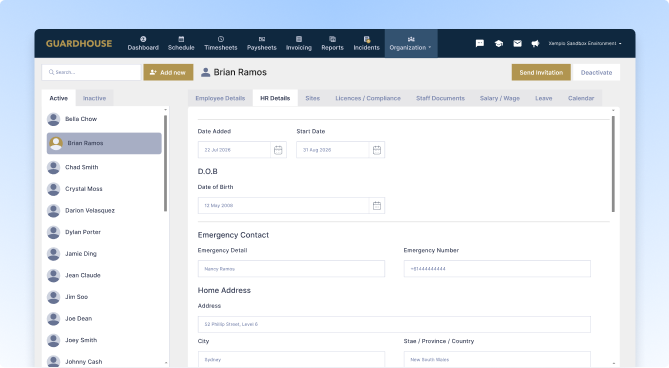
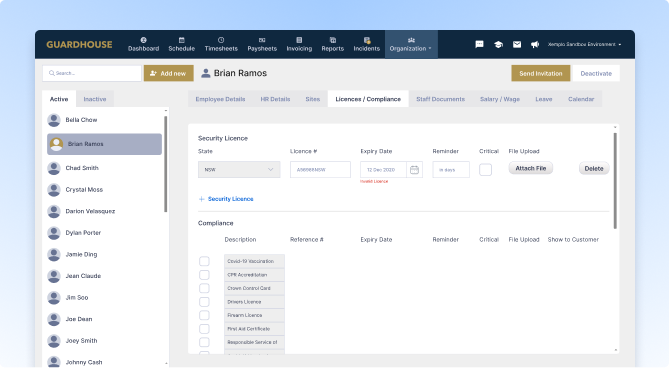
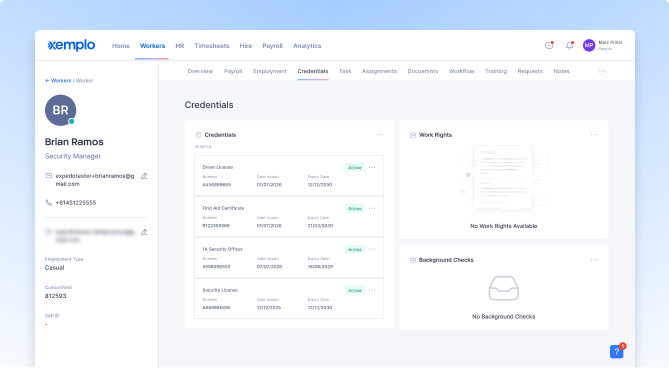
Xemplo and Guardhouse support two connected parts of your workforce.
Xemplo manages the people and compliance side: onboarding new guards, collecting worker information, and verifying the licences and requirements they need to work.
Guardhouse manages the operational side: rostering, deployment, and day-to-day security workforce management.
Once onboarding is completed in Xemplo, the worker’s profile and security licence information are automatically created in Guardhouse, ready for your operations team to roster.
There’s no need to rebuild the same employee record or manually hand information between HR and operations.
And if you continue using Xemplo for ongoing workforce compliance, both relevant worker and licence updates will continue to sync directly into Guardhouse.
Xemplo can also capture payroll information during onboarding and send it to your designated payroll system – ensuring each new guard is ready to work, ready to roster, and ready to pay.
Your operations team keeps working in Guardhouse, while Xemplo takes care of the people and compliance side upstream.
Why connect Guardhouse to Xemplo?
Once onboarding is completed in Xemplo, the worker’s profile and security licence information are created in Guardhouse automatically. Your operations team gets a roster-ready worker without waiting for someone to manually re-enter their details.
Capture worker information once during onboarding in Xemplo. Relevant profile information, including contact details, emergency contacts and security licence details, is then sent into Guardhouse automatically.
Capture worker information once during onboarding in Xemplo. Relevant profile information, including contact details, emergency contacts and security licence details, is then sent into Guardhouse automatically.

Capture important security licence information during onboarding, including the issuing authority, licence number and expiry date. Those details are then synced in Guardhouse against the worker profile.

Use Xemplo just for new starter onboarding, or continue using it to manage workforce compliance beyond day one. Either way, completed workers can move into Guardhouse ready to roster. If you use Xemplo for ongoing compliance, relevant worker and licence updates can continue to sync too.

Capture the payroll information you need as part of the same onboarding process. Xemplo can send that information directly to your payroll system, helping make each new guard ready to roster and ready to pay without another manual handover.
When a worker completes onboarding in Xemplo, the relevant employee and security licence information is automatically sent into Guardhouse.
If you also use Xemplo for ongoing workforce compliance, relevant worker updates can continue to flow into Guardhouse as details change.
| In Xemplo | Sync Direction | In Integration |
|---|---|---|
 Onboarded Worker
|
→ |
 Staff – Details
|
|
Worker
|
→ |
Staff
|
|
Credential
|
→ |
Licences / Compliance
|
|
Worker Updates
|
→ |
Staff – Details
|
When an employee completes onboarding in Xemplo, a corresponding employee record is created in Guardhouse. This gives your operations team a ready-to-roster worker profile without requiring you to manually rebuild the record from scratch.
The new employee's core details are synced to their Guardhouse profile – including first, middle, and last name, personal email, mobile number, gender, date of birth, start date, emergency contact name and number, street address, suburb, and state.
The employee’s security licence is sent into Guardhouse – including the issuing authority, licence number and expiry date. This means the worker’s key licence information is already available to the ops team when they’re ready to be rostered.
If you use Xemplo for ongoing workforce compliance, relevant changes to worker information (such as updated contact details or renewed licences) can continue to sync into Guardhouse. This helps keep both systems up to date without manual re-entry.
Get guards ready to work and ready to roster with less admin between systems.
Request a Demo